How to ask your bridesmaids when you can't hand them a box
Send each friend a scratch-off card that hides the question: they scratch, read “Will you be my bridesmaid?” and tap Yes. You get the answer by email, it opens on their phone with no app, and you can make it for free in a few minutes, from text to long distance.
By bemypresent · Updated
The example
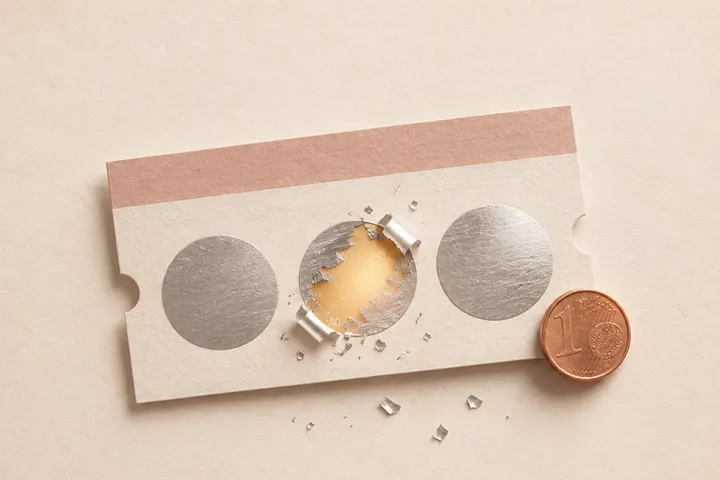
You can change all of it before you send it. Free, no sign-up.
How to make a digital bridesmaid proposal
- Start from the example on this page and write her name. The link preview says “Jordan, scratch to find out,” so the question stays hidden.
- Leave the question as “Will you be my bridesmaid?” or change it to maid of honor, matron of honor or bridesman.
- Add the date and the place, and the line she'll see after she says yes.
- Write a short letter, up to 400 characters, and publish it by confirming your email with a 6-digit code.
- Send the link. When she taps Yes, you get it by email.
The joke at the start is optional. With a fake prize, the card says “Scratch to win a free trip to Cabo” and then “You didn't win a free trip to Cabo… but you did win this,” right before the question.

Asking your whole bridal party at once
With the Pro plan ($9.99, one payment per gift), the same card goes to up to 30 people and each one gets her own link, with her name in the preview. You write it once, and nobody finds out from the group chat before you've asked her. On Free, it's one person per card, and it opens once within 24 hours of publishing.
Bridesmaid proposal over text
Asking over text is fine, and wedding forums are full of brides who did. What makes it land is the order: the question first, then the details, so she can say yes before she starts doing math. Send the card, and right after she answers, follow up with what it involves: the date, the dress budget, the bachelorette, and whether there's a shower.
No pressure, no box, no glitter. Just a question I've been wanting to ask you since you caught the bouquet at Sarah's wedding.
You've been my maid of honor since you were 6 and made me wear your tutu to school. Let's make it official.
You married my brother, which means you're stuck with me. I'd love it if you stood next to me in June.
Bridesmaid proposal ideas for long distance
Ask on FaceTime
Call her, send the link and watch her scratch it. You get the reaction you'd have had in person, and she gets to ask you everything right away.
Lock it until the day you choose
With Premium ($19.99), the link stays closed until a date you pick, like her birthday or the day after the engagement party. Send it to everyone early and they all open it the same morning.
A card in the mail, with a QR code
If you like having something on paper, print the card's QR code (it comes with Pro) and put it in a regular envelope. Mail is cheaper than a proposal box and nothing gets crushed on the way.
Bridesmaid proposals that aren't a card
Just ask her in person
Plenty of brides in the wedding forums point out that proposals are a recent social media habit. If you'll see her this week, asking over coffee is enough.
A printed card from Etsy or Canva
For a card she can keep on the fridge, a printable template does the job. Write the details on the back so she knows what she's saying yes to.
Dinner with all of them
If your bridesmaids live in the same city, a dinner where you ask everyone at once turns into the first night out of the wedding.
How to make it with bemypresent
Pick how it opens
A birthday, an anniversary, Christmas, a memory album or a box with a surprise inside.
Make it yours
Add the names, your photos and a message. You see it exactly as they will, and it saves as you type.
Publish it
Confirm your email with a code, no passwords. We send you the link and its QR code, and you'll find it in your account on any device.
Share it
By text, on WhatsApp or with the QR code printed inside a card. They open it on their phone, no app needed.
Frequently asked questions
Is it okay to ask your bridesmaids over text?
Yes. Many brides ask by text or with a digital card, especially when friends live far away. Follow up with a call or the details so she knows what's involved.
Is there a free digital bridesmaid proposal?
Yes. On the Free plan you can make it and send it to one person, and it opens once within 24 hours of publishing. To ask several friends, each with her own link, it's Pro ($9.99).
Will I know if she says yes?
Yes. When she taps Yes or No, the answer reaches you by email.
Does she need an app?
No. It opens in the browser on her phone or computer, with no account.
You might also like
- How to ask someone to be your Valentine with a link
Make a will you be my Valentine website with their name, a Yes and a No that runs away. Free to start, no code, and you get an email with their answer.
- How to do a gender reveal online when the family can't be there
Do an online gender reveal with a free digital scratch-off card: everyone scratches it on the video call and finds out boy or girl at the same time.
Make it your own
Create my gift