A digital pregnancy announcement for the people who should hear it first
A digital pregnancy announcement doesn't have to be the same image for everyone. Make a scratch-off card with one person's name on it, send them the link, and the news stays hidden until they scratch it on their phone. It's free to make and send to one person, and they don't need an app.
By bemypresent · Updated
The example
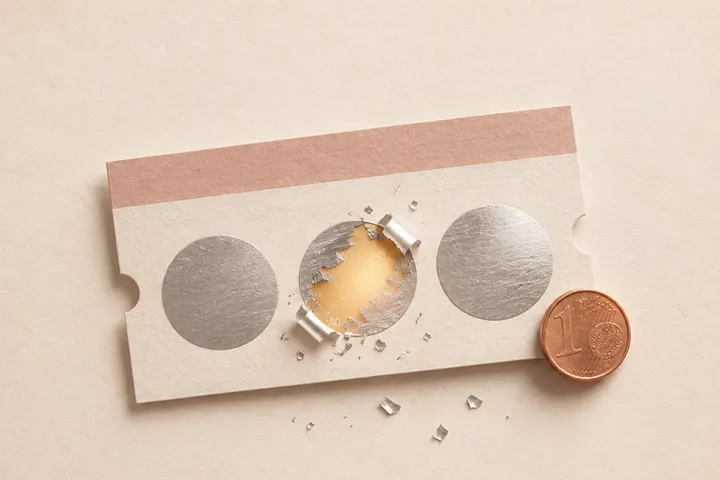
You can change all of it before you send it. Free, no sign-up.
How to make a digital pregnancy announcement for free
- Start from the example on this page and write their name. In the chat, the link preview says “Taylor, scratch to find out,” not the news.
- Write what they'll find under the scratch-off: “There's a baby on the way!”, “You're going to be grandparents!” or your own line.
- If you want, add the due date, a photo of the ultrasound and a question at the end with a Yes and a No.
- Write a short letter, up to 400 characters, and sign it.
- Confirm your email with a 6-digit code to publish it, and send the link by text, WhatsApp or email.
If they answer the question, or leave a reaction at the end, you get it by email.
A post for everyone, or a card for one person
Most digital pregnancy announcements online are images for social media: a template from Etsy or Canva where you upload the ultrasound and change the last name. They're made to be seen by everyone at once, which is right for the public post. The people closest to you usually expect something else: to hear it from you, before anyone else, with something they open themselves.
- First the people who'd be hurt to find out from a post: parents, in-laws, siblings, your best friend. One card each, with their name.
- Then, if you want one, the post. That's where an Instagram template does a better job than a scratch-off card, which is a link and not an image.

Digital pregnancy announcement ideas, by who's opening it
Your parents
Put “You're going to be grandparents!” under the scratch-off and ask them to open it while you're on the phone. If they live far away, here's how to do a long distance pregnancy announcement.
Your best friend
The fake prize is the joke that works best here: “Scratch to win a lifetime supply of tacos,” then “You didn't win…” and the news. End with the question you've been waiting to ask.
Your partner
If you found out while they were away on a trip or a night shift, a card they scratch beats a text that says “call me.” Keep the letter short and save the rest for when you're together.
Everyone in the family at once
With Pro ($9.99, one payment per gift), the same card goes to up to 30 people and each one gets their own link with their name. Nobody gets the news forwarded from someone else.
The ultrasound in a card
If you'll see them this week, a printed ultrasound inside a card you hand over in person is hard to beat. The digital one is for when you can't be in the room, or can't wait until you are.
What to write in a digital pregnancy announcement
You've been asking when you'd get to spoil someone. Now you have a date: June 9.
You noticed I stopped ordering margaritas. You were right to be suspicious.
I took the test this morning and you were 900 miles away. I couldn't say it over text, so scratch this, and call me.
Congratulations, you've been promoted to big sister. Again. Pay is the same, hours are worse.
What's free and what isn't
On the Free plan you make it without an account, send it to one person and it opens once, within 24 hours of publishing. Whoever opens it can save it to keep. Pro ($9.99) is for sending it to several people with their own link, or a card they can open again whenever they want, and it comes with a QR code you can print. Premium ($19.99) adds keeping it locked until a date and emailing it for you. For Christmas, there's a page of Christmas pregnancy announcement ideas.
How to make it with bemypresent
Pick how it opens
A birthday, an anniversary, Christmas, a memory album or a box with a surprise inside.
Make it yours
Add the names, your photos and a message. You see it exactly as they will, and it saves as you type.
Publish it
Confirm your email with a code, no passwords. We send you the link and its QR code, and you'll find it in your account on any device.
Share it
By text, on WhatsApp or with the QR code printed inside a card. They open it on their phone, no app needed.
Frequently asked questions
How do I make a digital pregnancy announcement?
Pick a scratch-off card, write their name and the news you want to hide, add a short letter and publish it with your email. You get a link to send by text or WhatsApp.
Is there a free digital pregnancy announcement?
Yes. On the Free plan it costs nothing to make and send to one person, and it opens once within 24 hours of publishing.
Can I post it on Instagram?
Not as an image: it's a link that opens a card. For the public post, a Canva or Etsy template is the better tool. The card is for the people who should know first.
Will they see the news before they scratch?
No. The link preview shows their name and “scratch to find out,” and the envelope shows only the line you write.
You might also like
- How to tell your parents you're pregnant when they live far away
How to tell your parents you're pregnant when they live far away: a scratch-off card they open on FaceTime, ideas for long distance family and what to write.
- How to tell your parents you're pregnant at Christmas
Ways to tell your parents they'll be grandparents this Christmas, even from far away, and a free digital scratch-off card that opens on their phone.
Make it your own
Create my gift